
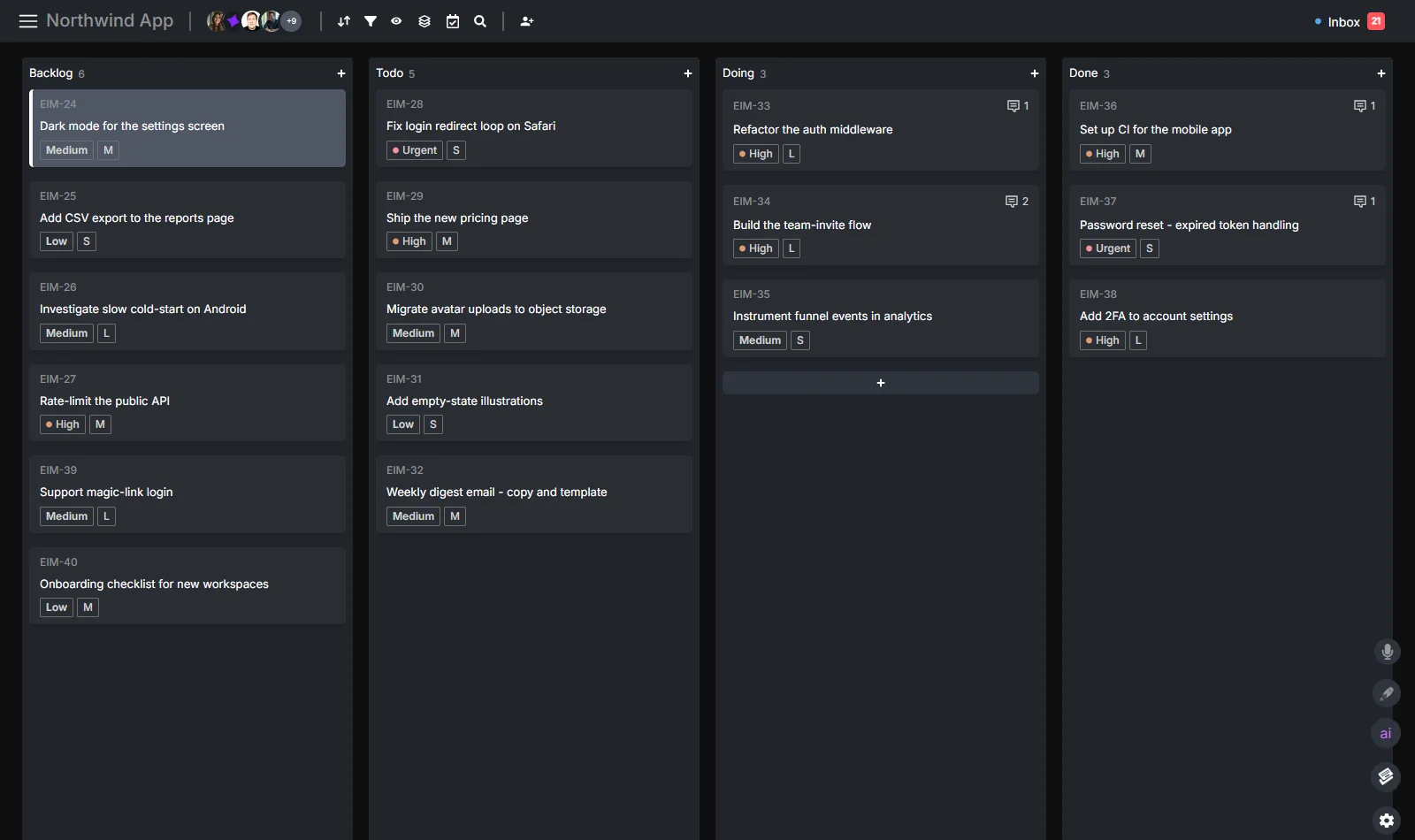
AI agent task management is not the same thing as asking an AI assistant to make a to-do list. The useful version is operational: an agent claims a task, updates the task while it works, reports the result in context, and closes or hands off the task when the work is ready.
That lifecycle matters because agent work gets hard to trust when it lives outside the board. If the agent only writes to a terminal, a chat window, or a pull request, the team still has to translate that output back into the project system. The board stays stale, the human becomes the relay, and nobody can quickly answer what the agent picked up, what it changed, or what still needs review.
This guide is deliberately narrower than our complete guide to AI agents in project management. The pillar covers the broad infrastructure case: MCP, CLI, agent seats, attribution, and multi-agent coordination. This post focuses on the day-to-day task lifecycle when agents are doing the work.
The Agent Task Lifecycle
The loop is simple enough to write on a card:
| Stage | Agent action | Human signal | Board state |
|---|---|---|---|
| Claim | Pick one clear task and move it into progress | Everyone can see the task is taken | Todo to Doing |
| Update | Post progress or blockers on the task | Reviewers see context without watching a terminal | Comment thread grows |
| Report | Summarize what changed, what passed, and what needs review | Human can approve, ask for changes, or ship | Doing to Review |
| Close | Move the task to Done or back to Todo with next steps | Board reflects reality | Review to Done or Todo |
The important part is not the column names. Your board might say Backlog, In Progress, QA, Done. What matters is that every state change is written to the same board humans use.
Agents should not keep a private shadow status. If the agent is working, the task should show as working. If the agent is blocked, the task should say why. If the agent finished, the result should be on the task, not hidden in a transcript.
That is the difference between “AI helped me” and “AI is part of the workflow.”
Step 1: Make Tasks Agent-Readable
An agent can only manage tasks that are written clearly enough to be executed. This does not mean every task needs a heavyweight spec. It means the task needs the minimum context an agent can safely act on without guessing.
A good agent-ready task has five parts:
- Outcome: What should be true when the task is done.
- Context: Links, files, customer notes, or constraints the agent needs.
- Scope boundary: What the agent should avoid changing.
- Definition of done: The test, review step, or artifact that proves completion.
- Human owner: The person who decides whether the result is acceptable.
For software work, that might be a ticket that names the failing route, the intended behavior, the files likely involved, and the test command. For content work, it might be a brief, an outline, target query, internal links, and a publication checklist. For ops work, it might be the data source, transformation rule, approval threshold, and escalation path.
Do not optimize for making the task long. Optimize for making it unambiguous. Agents perform better when the task has a clear edge.
If your agents still start from pasted task lists, read why AI agents need a real project board first. A pasted list is a snapshot. The task lifecycle below assumes the agent can read and write the live board.
Step 2: Let the Agent Claim Exactly One Task
The first write an agent makes should be a claim. It should mark one task as in progress before doing the work.
That claim prevents duplicate effort. It also gives humans a useful signal: this task is not forgotten, and it is not sitting idle. An agent that does work without claiming the task creates the same confusion as a teammate who says nothing until the end of the day.
With the Hypertask CLI, a scripted agent loop can start like this:
hypertask inbox list --json
hypertask task get YPER-123 --json
hypertask task move YPER-123 --section "Doing"
hypertask comment add YPER-123 --text "<p>Claimed. I am checking the build failure and will report back with the failing step, fix, and validation result.</p>"
With MCP, the same pattern happens through tool calls instead of shell commands:
hypertask_inbox_listto see assignments and replies.hypertask_get_tasksto load the task.hypertask_update_taskto move it into the working section.hypertask_add_comment_to_taskto post the claim.
Use MCP for interactive agents in Claude Code, Cursor, Windsurf, or another MCP-capable environment. Use the CLI for scheduled loops, CI jobs, and scripts. The deeper tradeoff is covered in CLI vs MCP for AI agent project data access.
One rule keeps this clean: the agent claims one task at a time unless the workflow is explicitly batch-oriented. Multiple claimed tasks make the board less truthful. If the agent can only actively work on one thing, the board should show one thing in progress.
Step 3: Post Updates Where Humans Will Actually Read Them
Agent progress updates belong on the task.
Not in the terminal. Not only in a pull request. Not in a chat transcript that disappears after the session. The task is the durable place where the team will look later.
A useful progress update is short and specific:
<p><b>Progress:</b> reproduced the failing checkout state locally. The regression appears to come from the discount-code validation path, not payment creation. Next I am adding a test around the invalid-code branch.</p>A useful blocker update gives the human a decision:
<p><b>Blocked:</b> the task asks me to update production pricing copy, but the latest approved pricing source is unclear. Please confirm whether the source of truth is the pricing page or the sales deck.</p>The update should not narrate every internal step. Humans do not need a play-by-play. They need enough context to trust the work, unblock it, or review it later.
This is where a task-anchored inbox matters. When an agent posts a comment, the right human should see it as an inbox item tied to that task. The reviewer should not have to monitor every agent run. They should process agent updates in the same async queue they use for teammate replies.
That inbox discipline is the operational reason agent work can stay quiet. Without it, agent adoption turns into another notification firehose.
Step 4: Report Results Like a Teammate
When the work is done, the agent should post a final report before moving the task onward.
The report should answer four questions:
- What changed?
- How was it validated?
- What risks or follow-ups remain?
- What does the human need to review?
For a coding task, the final comment might look like this:
<p><b>Done:</b> fixed the checkout error by handling invalid discount-code responses before payment creation.</p>
<ul>
  <li>Changed: <code>src/lib/checkout.ts</code> and <code>src/routes/checkout.test.ts</code></li>
  <li>Validation: <code>npm test -- checkout</code> passed locally</li>
  <li>Review: please check the copy on the invalid-code message before release</li>
</ul>
For a content task, it might look like this:
<p><b>Ready for review:</b> drafted the Motion alternative article at <code>/blog/motion-alternative/</code>.</p>
<ul>
  <li>Included a comparison table, FAQ section, and internal links to the AI-agents pillar</li>
  <li>Build: <code>npm run build</code> passed</li>
  <li>Review: check competitor positioning and title before merge</li>
</ul>
The format is boring on purpose. A final report is not marketing copy. It is an audit trail.
This is also how you solve the attribution problem. If something breaks later, you can open the task and see which agent claimed it, what it changed, what it tested, and what it said was still risky. For the broader governance layer, see AI work attribution: knowing what your agents actually did.
Step 5: Close, Review, or Reassign
Agents should not always move directly to Done. The right close behavior depends on the risk of the work.
Use a Review section when the agent produces output that a human must approve before shipping: code, customer-facing copy, data migrations, pricing changes, destructive operations, or anything regulated.
Use Done when the agent completed low-risk work with deterministic validation: formatting a report, updating a non-production checklist, running a read-only audit, or collecting source links.
Use Todo or Blocked when the task needs human input before the agent can continue.
The point is to encode the approval model in the board itself. Humans should not have to infer from a comment whether the task is ready, blocked, or already closed. The column should say it.
A safe default for most teams is:
- Agent claims from Todo to Doing.
- Agent posts a final report.
- Agent moves from Doing to Review.
- Human approves and moves from Review to Done.
As trust grows, you can let agents close lower-risk task types directly. Do that by category, not by vibe.
How the Task-Anchored Inbox Keeps Humans in the Loop
The inbox is the human control surface. It is where agent completions, questions, and review requests should appear.
The mistake is treating agent updates like generic notifications. If every comment, state change, and intermediate log becomes a ping, humans will mute the system. If the inbox only surfaces updates that need attention, humans can review agent work in batches.
That means agent updates should be routed by task context:
- A claim comment usually does not need a human response.
- A blocker comment does.
- A final report in Review does.
- A routine status update may be archivable.
This is the same async model behind project management without notification overload. The communication is anchored to the task, and the inbox decides what needs attention now.
For agents, this matters even more than for humans. Agent work often happens while you are away. You should come back to a short review queue, not a pile of raw logs.
A Practical Agent Prompt for This Loop
You can put a version of this into your agent instructions:
At the start of each session, check your Hypertask inbox.
Pick one assigned task that is ready to work.
Before starting, move it to Doing and post a short claim comment.
Do the work using the task description and linked context.
If blocked, post a blocker comment with the exact decision needed.
When finished, post a final report with changed files or artifacts, validation, risks, and review request.
Move the task to Review unless the task explicitly says you may close it.
Do not work from a pasted task list when live board access is available.
That prompt is not magic. It works because the board gives the agent real tools: task reads, status writes, comments, assignments, and inbox access.
Without those tools, the prompt collapses into etiquette. With CLI and MCP access, it becomes an operating loop.
Frequently Asked Questions
What is AI agent task management?
AI agent task management is the workflow for letting AI agents operate real tasks on a shared board. The agent reads the task, claims it, posts progress, reports the result, and moves it to the next state. The goal is not just task generation. The goal is a reliable lifecycle where humans can see what agents are doing and review their output asynchronously.
How is this different from AI project management?
AI project management is the broader system: planning, boards, workflows, agent access, attribution, reporting, and human approval. AI agent task management is the narrower execution loop inside that system. It focuses on how an individual agent handles one task from claim to close. For the broader guide, read AI agents in project management.
Should agents use CLI or MCP to update tasks?
Use MCP when the agent is working inside an interactive AI environment such as Claude Code, Cursor, or Windsurf. Use the CLI when the agent is running as a script, cron job, CI step, or autonomous loop. Both can support the same lifecycle. The choice is about the agent runtime, not about which one is universally better.
Should AI agents be allowed to close tasks themselves?
Sometimes. For low-risk tasks with deterministic validation, direct close can be fine. For code, customer-facing copy, pricing, production changes, data changes, or anything ambiguous, the safer default is for agents to move work to Review and let a human close it. Define this by task type so the rule is predictable.
How do you keep agent updates from becoming notification overload?
Anchor every update to the task and route only attention-worthy items to the inbox. Claim comments and routine status notes can be low-noise. Blockers, review requests, and human mentions should surface clearly. The inbox should help humans batch-review agent work instead of forcing them to watch agent sessions live.
The whole loop is small: claim, update, report, close. The hard part is making sure the loop writes to the real board. Once agents can use CLI and MCP to read tasks, post comments, check the inbox, and move work between sections, the board becomes a shared operating surface for humans and agents.
Start with the complete AI agents project management guide if you are still designing the overall system. Use this task lifecycle once agents are ready to do work on the board.